


Family Tracker by Phone Number
4.51.20K Reviews
App Specs
- Version
- 2.24.2
- Updated On
- License
- Free
- Downloads
- 5,000,000+
- Developer
- SoulApps Studio
- Categories
- Parenting
- Platform
- Android, iOS
Screenshots

 Analysis by AppCompare
I think the clearest way to judge Family Tracker by Phone Number is to ask what problem you want it to solve. If your family members agree to share their locations, a shared map can make everyday coordination easier and give you a practical way to check whether someone has arrived. It is not a substitute for calling, texting, or having an honest conversation, and it works best when everyone treats it as a mutual safety tool rather than a way to monitor one another.
What the free starting point tells you
This is a free parenting app from SoulApps Studio, with optional in-app purchases listed from $0.99 to $49.99 per item. That makes it possible to try the basic experience without paying upfront, but I would not assume every feature or use pattern is included at no cost. The listed range is broad, so I’d check the purchase details shown in the app before committing to anything. Free access is a useful starting point; it is not, by itself, proof that every part of the service is free.
The app is rated Everyone and runs on Android 5.0 or later. Its current version is 2.22.2, and it has an average rating of 4.6 from around 118,000 ratings. More than five million installs and around 1,200 written reviews suggest that plenty of people have tried it, though popularity cannot tell you whether its location-sharing approach suits your household. I’d use those figures as context, not as a promise that the app will work perfectly on every phone or in every family routine.
What the map is useful for in real life
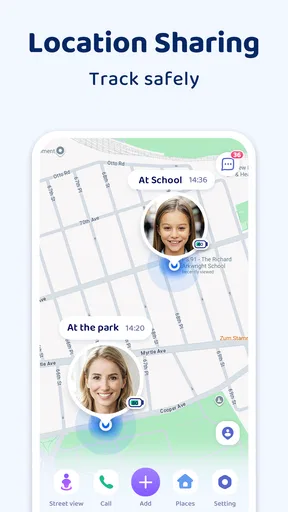
The most convincing use case is ordinary coordination. Imagine a parent finishing work while a teenager is traveling home from an activity. Instead of sending repeated “Where are you?” messages, the parent can check the shared map, then contact the teen if the route or timing raises a real question. That can reduce unnecessary calls, but it only helps when location sharing is enabled and the family has agreed on what a map check does—and does not—mean.
For younger children, the practical value is different. A location view can help a caregiver coordinate a pickup or confirm that a family member has reached a familiar destination. I would still make the child’s routine and safety rules the main plan: agree on who is collecting them, what to do if plans change, and how to get help. A phone’s reported position is a useful clue, not a guarantee that the person is safe or that the map is perfectly current.
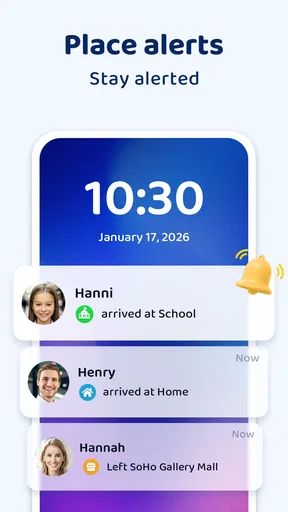
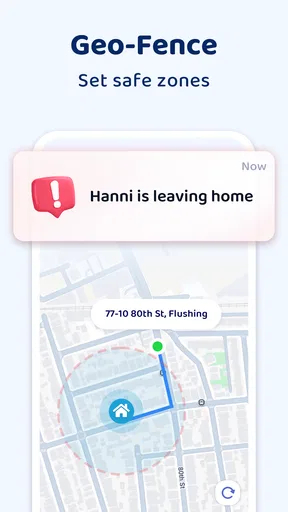
Geofencing is most helpful when you keep it tied to a small number of places that genuinely matter, such as home or a regular school-related destination. If every errand, friend’s house, and temporary stop becomes an alert zone, the notifications can become background noise. I’d begin with one familiar boundary, see whether it produces useful reminders, and add another only when it solves a recurring coordination problem. That small setup choice can make the difference between a calm check-in and an app you learn to ignore.
Useful habits before relying on tracking
Before inviting anyone, I’d agree on a simple family rule: when is checking the map reasonable, and when should someone send a message instead? That conversation makes the app’s purpose concrete. For example, a parent might check whether a child has arrived after a planned trip, while avoiding constant checks during school or social time. Clear expectations matter more than adding every possible location alert.
Worth Reading Before You Choose

Switching to Android Auto Means Rethinking Your Driving Routine

Google Calendar Makes a Crowded Week Easier to Manage

Baby Panda World Brings Quick Play to Modern Phones, but Its Game Library Feels Busy

ESPN’s Live Game View Makes Following Close Games Easier

QuizzLand Review: A Good Fit for Short Trivia Breaks, Not Every Player

Basketball Stars: Multiplayer Is Fast, but Can It Recover When Matches Go Wrong?
It also helps to test the setup together while everyone is at home. Confirm that each invited person understands the sharing arrangement and knows how to pause sharing if they need to. Then try a normal trip and compare the map with what actually happened. This is not a technical guarantee, but it gives the family a realistic sense of how the app behaves on its own devices before anyone relies on it during a time-sensitive pickup.
For a household with shared caregiving, decide who needs access and why. A child’s parent, another trusted caregiver, and a relative who occasionally handles pickups may have different needs. Inviting a large circle by default can make the map feel less private without improving safety. I’d keep membership limited, review it when caregiving arrangements change, and make sure the person being located knows who can see their position.
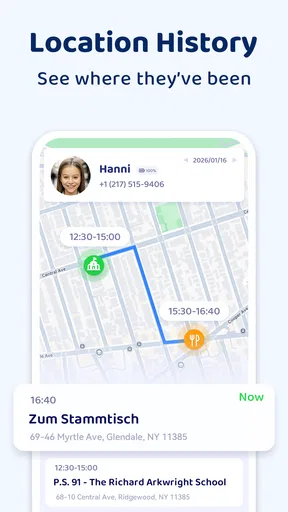
Location history can be tempting when someone’s movements are unclear, but I’d treat it as a conversation aid rather than evidence. A route can provide context, yet it cannot explain why someone stopped, whether plans changed, or what happened inside a building. If a family member is late, a direct call or message is usually a better first move than interpreting a trail and drawing conclusions from it.
Getting Started with Family Tracker
First things first, downloading the app was a breeze. It's available on both Android and iOS, so no one's left out of the loop. Once installed, the setup process is pretty straightforward. You create an account, verify your number, and boom, you're in. The app asks for permissions to access your location, which is kind of expected given what it needs to do. Don't worry, it's all pretty standard, and they assure you that your data is safe and sound.
Interface and Usability
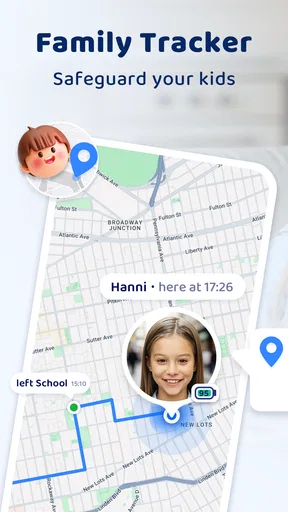
Now, let's talk about the interface. It's clean, intuitive, and doesn't throw a million options at you right off the bat. The main screen shows a map with the location of everyone in your circle. Adding family members is as easy as pie—just send them an invite, and once they accept, their location shows up on your map. I found this feature super handy, especially for keeping track of my ever-adventurous teens.
Navigation through the app is smooth, and everything is pretty much where you'd expect it to be. There's a nifty real-time tracking feature that lets you see exactly where someone is at any given moment. It’s like having a GPS for your family, which can be both reassuring and, let's face it, a bit creepy if overdone.
Features That Stand Out
One of the standout features for me was the geo-fencing. You can set up specific areas and get notified when someone enters or leaves a designated zone. So, if you're worried about your kid skipping school or your partner not making it to the gym, you’ve got it covered. The alerts are quite prompt, and I didn't notice any significant delay.
The app also boasts a history log, where you can track the movements of each family member over a certain period. This can be particularly useful if you're trying to piece together where someone has been without needing to ask them directly.
Privacy and Security Concerns
Of course, with great power comes great responsibility—or in this case, a few privacy concerns. The app seems to take privacy seriously, with decent controls over who can see your location and when. You can temporarily stop sharing your location without having to explain yourself, which is a nice touch.
However, it’s essential to have an open conversation with your family about using the app. Trust is key, and while the app provides a lot of information, it’s crucial to use it responsibly. No one wants to feel like Big Brother is watching them all the time, right?
Where it sits among family options
Compared with a group chat, a shared location map answers a different question. Messages are better for explaining a delay, changing a pickup plan, or asking someone to confirm they are okay. A map can help avoid a string of check-in texts when the only question is whether someone has arrived. I would use both: the map for a quick situational check, and a conversation whenever the answer needs context.
Some phones also offer built-in location sharing, which may be enough for a family that only needs occasional visibility and wants to avoid installing another app. A dedicated family tracker is more appealing when a household wants a shared place to check locations and use features such as geofencing or a history log. The trade-off is another app to configure, explain, and maintain. If your family already has a simple system that everyone understands, switching just for a map may not improve much.
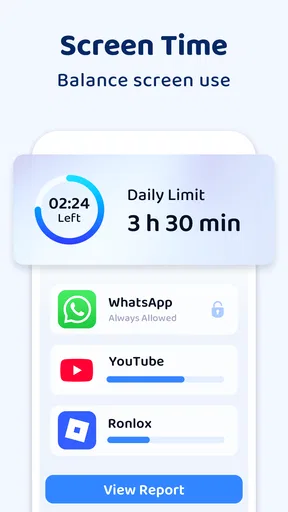
It is also different from a child-focused parental-control tool. Location sharing can support a safety routine, but it should not be mistaken for a complete approach to screen time, online activity, or device rules. If those are the main concerns, a tool designed around parental controls may fit better. I would choose this app for location coordination, not treat it as an all-purpose parenting solution.
What can get in the way
Location apps depend on circumstances outside the map itself. A phone may be left behind, switched off, or unable to provide a useful position at a particular moment. A displayed location can also be less helpful indoors or when someone is moving between places. For that reason, I would not use the map as the sole plan for emergencies or assume that a quiet screen confirms everything is fine. A call, a trusted adult, and a clear backup arrangement still matter.
There is a social cost to constant checking, too. Teenagers in particular may feel that sharing turns every normal stop into something they must justify. That can make a family less trusting rather than more connected. I’d explain that the goal is coordination and safety, set reasonable limits on checking, and be willing to revisit the arrangement as children become more independent. If someone feels pressured into sharing, the app’s convenience is not worth the damage to trust.
Another point to consider is the difference between an alert and a conversation. A boundary notification can tell you that a device crossed a chosen area; it cannot tell you whether the person had permission to change plans or whether a pickup was arranged. I would avoid reacting to an alert as if it were a full account of events. Use it to decide whether a simple check-in is needed, then listen to the answer.
Battery and data habits can also affect how useful any location-sharing setup feels, even though the app’s value is not just a question of the map. If a family member is concerned about keeping location services active, talk that through before setting expectations around constant availability. Do not promise that one person will always appear on the map; agree on a backup such as a text at arrival or a call if plans change. That makes the routine more resilient and reduces frustration when the app is not the quickest way to get an answer.
Who is likely to get value from it
I can see this being a good fit for families that coordinate school runs, activities, and shared pickups, especially when members are comfortable with location sharing and already communicate openly. It may also suit relatives who want a straightforward way to check whether a loved one has reached a familiar destination. The useful feature is not simply knowing where someone is; it is reducing a specific bit of uncertainty that otherwise leads to repeated calls or awkward timing.
It is less suitable for anyone looking for invisible tracking, a way to control another adult, or a replacement for direct contact. It is also not the best match for a household that does not agree on sharing, has little need for location checks, or would find alerts stressful. In those situations, an occasional text, a shared calendar, or the phone’s existing location-sharing option may be enough. Choosing not to install a tracker can be the sensible choice when the family’s routine does not call for one.
If you are deciding whether to pay for anything in the app, first identify the exact task you want the purchase to improve. The free starting point gives you a chance to see whether the basic map and setup are useful to your family. I would not spend simply because a paid option is visible; I’d look at its in-app description, compare it with your actual routine, and make sure everyone who will use the feature agrees it is worth the cost. The listed purchase range is wide enough that checking the specific item matters.
The app is intended for a broad audience, with an Everyone content rating, but that label does not settle the family conversation about consent. Parents should explain location sharing in language a child understands and adjust expectations to the child’s age and independence. For adults in the circle, consent should be explicit rather than treated as automatic because they are related. A respectful setup is more likely to remain useful than one imposed without discussion.
The Final Verdict
So, is Family Tracker by Phone Number worth downloading? If you're looking for a way to keep an eye on your family without constantly blowing up their phones, this app is definitely a strong contender. It’s easy to use, comes packed with useful features, and most importantly, delivers on its promise of keeping you connected with those you care about.
Just remember, with any tracking app, communication is key. Make sure everyone in your circle is comfortable with the idea, and you'll find that it can be an invaluable tool in your family’s digital toolkit.
My practical recommendation
I would try it if the family has a clear, recurring reason to share locations—such as coordinating arrivals—and if everyone is willing to participate. Start with a small circle and a modest setup, then see whether the map and alerts genuinely save effort. If the app becomes a source of arguments, constant checking, or confusing alerts, scale back or stop using it rather than treating more tracking as the answer.
For value, the free entry point makes a cautious trial possible, while the optional purchases mean the experience can involve spending if you choose paid items. I would judge any purchase against a specific benefit, not against a general promise of peace of mind. With that approach, the app can be a useful parenting and family-coordination aid. Without shared expectations, a regular check-in message or a simpler built-in option may be the better choice.
Pros
- Easy to set up and use interface.
- Real-time location updates available.
- Supports geofencing alerts.
- Battery-efficient tracking mode.
- Works on both Android and iOS.
Cons
- Requires constant internet connection.
- Location accuracy can vary.
- Some features are premium only.
- Notifications can be overwhelming.
- Limited customization options.
FAQs for Family Tracker by Phone Number
What features does Family Tracker by Phone Number offer?
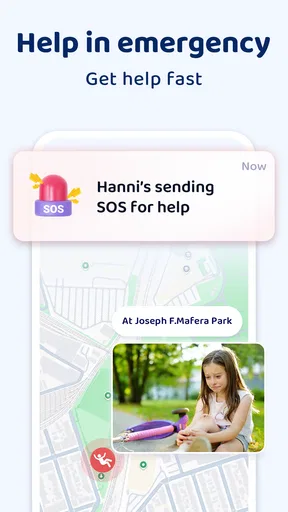
Family Tracker by Phone Number provides real-time location tracking, geofencing alerts, and location history. It allows users to set up safe zones and receive notifications when family members enter or leave these areas. Additionally, the app supports emergency alerts and has a user-friendly interface for easy navigation.
Is Family Tracker by Phone Number safe to use?
Yes, Family Tracker by Phone Number prioritizes user privacy and security. It uses encrypted data transmission to ensure that location information remains confidential. Users can control who sees their location and adjust settings to suit their privacy preferences. Always review the app’s permissions to maintain control over personal data.
Does the app require an internet connection?
Yes, Family Tracker by Phone Number requires an internet connection to function effectively. It relies on GPS and network data to provide accurate location tracking. Users should ensure their devices are connected to the internet, either through Wi-Fi or mobile data, for optimal performance.
Can I track multiple family members with this app?
Absolutely. Family Tracker by Phone Number supports tracking multiple family members simultaneously. Users can add various family profiles and view their locations on a single map interface. This feature is particularly useful for families with children or elderly relatives who need close monitoring.
Are there any subscription fees for using Family Tracker by Phone Number?
Family Tracker by Phone Number may offer both free and premium subscription plans. The free version typically includes basic features, while premium plans provide advanced functionalities like enhanced geofencing, detailed location history, and priority support. Check the app store for specific pricing details and subscription options.


